Showing posts with label ios. Show all posts

Tuesday, 17 July 2012

Apple iOS 6 beta 3 is now seeding to developers


Apple iOS 6 beta 3 is now seeding to developers

Three weeks after iOS 6 beta 2 became available, Apple has began seeding the third beta version of its latest mobile OS. The iOS 6 beta 3 update is available as an over-the-air download to everyone running the previous release.
As always, the update offers various bug fixes and performance improvements. They include the addition of more 3D city flyovers in the Maps application, as well roadwork and traffic information. Furthermore, the update brings the beginning of the migration of MobileMe (me.com) email addresses to iCloud.com ones.
Source

Tuesday, 12 June 2012

iOS 6 goes official with new Maps and Facebook integration

Apple has just announced the next version of its iOS platform for the iPhone, iPod Touch and the iPad. iOS 6 has an updated Siri, Facebook integration and completely new Maps application with built-in turn-by-turn navigation as its key features.

The evolved Siri got the most stage time – it now launches apps, can fetch you news and facts about sports, movies, people, read your notifications. Apple is working with BMW, GM, Mercedes, Land Rover, Jaguar, Audi, Toyota, Chrysler, Honda and others in an attempt to put a dedicated Siri button on the steering wheel on all cars throughout the next 12 months. This would enable completely hands-free operation of your iDevice when you are driving.


The updated Siri


Siri also got support for new languages – Canadian English, Spanish (Spain, Mexico), Italian, Korean, Mandarin, Cantonese and Chinese. 


The updated Siri


With iOS 6, Siri is finally landing on the iPad, but only if you have the latest Retina-packing version of the slate.
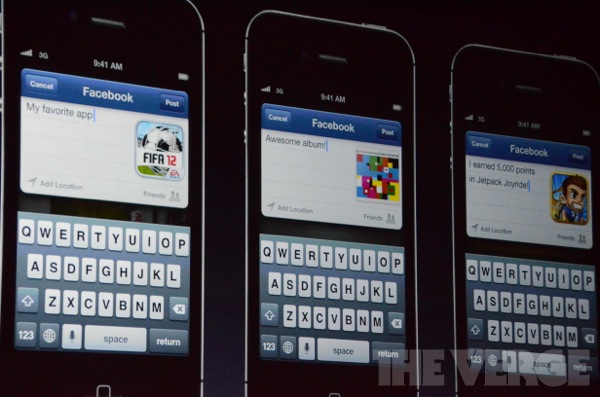
The iOS 6 also brings the long-awaited Facebook integration. It works throughout the whole platform, just like the already available Twitter one. You get an Android-style phonebook app, where your regular contacts are connected to their Facebook profiles and you get updates on their albums, messages and status updates right from the contact's screen.


iOS 6 Facebook integration


The Notifications Center has two new additions – Update Twitter and Update Facebook status shortcut keys.


iOS 6 Facebook integration


The next new feature is Reply with Message when you can’t answer a call. Okay, this one isn't really major and everyone else probably already has it, but it's still good that Apple finally enabled it. There's also another new button on the incoming call screen, which will mute the call and will remind you about it later so you can call back.


The new call options


The iOS 6 brings a new Do Not Disturb mode, which mutes all push notification, incomming calls and prevents the screen from lighting up, so it doesn't disturb your sleep or hard work. You can schedule your iDevice to automatically enter Do Not Disturb mode at a specific time every day.

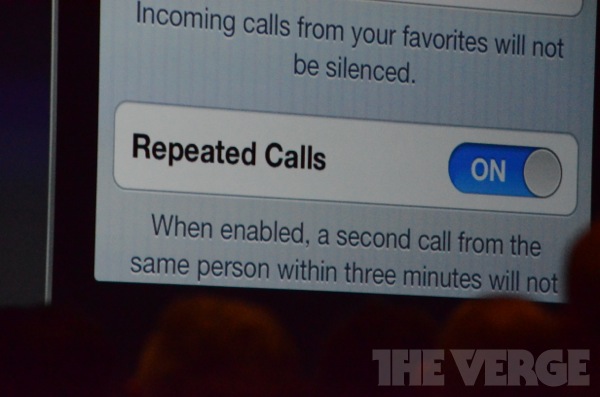
The Do Not Disturb mode can be set to still let through messages and calls from your favorite contacts and groups as well as repeating calls, so your loved ones and those that need to contact you urgently can always reach you.


The new Do Not Disturb Mode


FaceTime also got updated with iOS 6. The video-call app now works over cellular networks, not just Wi-Fi. About time, we would add!

The FaceTime/iMessages ID is now unified and if someone is calling/texting you, you will be able to get the call from your iPhone, iPad or Mac – whatever works for you.

The Safari browser has learned a few new tricks in iOS 6. It now has iCloud Tabs, which are synced with your desktop Safari in real time along with an offline reading list. Another cool extra is the ability to upload photos right from the browser to Facebook, Twitter, Picasa, etc.


The new features in Safari


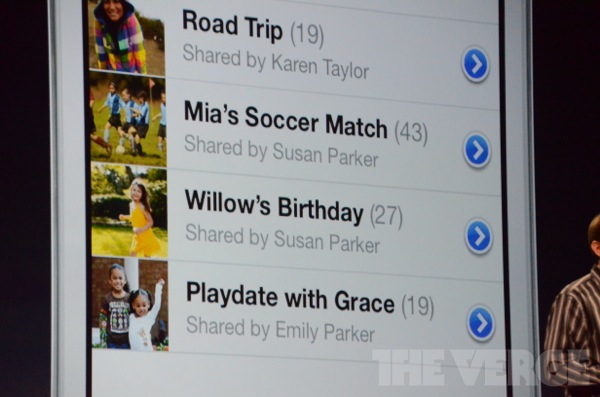
Shared Photo Stream is another new feature with a social taste. It lets you select contacts and give them access to the photos you are uploading. Once you upload a new album said contacts will be notified and they will get the chance to check your shots and post comments on them.


Sharing photos in the Photo Stream


The next new feature is VIP contacts. You mark a contact as VIP and all the messages you get from that contact will be highlighted, so you'd know to check them out first.


The new Mailbox


The iOS 6 introduces a new preinstalled app called Passbook. It will collect all of your boarding passes, tickets, coupons, loyalty cards etc. and keep them neatly organized. QR codes scanning is supported, so you can easily get those on board.


The Passbook


As the main change brought by iOS 6 is a new Maps application, called... Maps. Apple has ditched Google Maps and is introducing its own service to replace it. The new maps have cool design and offer local search options with Apple claiming to have inserted more than 100 billion business listings already. The new Maps support 3D mode and satellite view.


The new Maps


As long as you are touting an iPhone 4S or an iPad 3 you get turn-by-turn navigation which works even on the lockscreen and a Flyover view mode just like the one Google announced the other day. Even more impressively, there is integration with Siri (search of gas stations, parking lots, etc.).


The new Maps


The final noteworthy features of iOS 6 include accessibility extras, better privacy controls, improved voiceover and dictionaries, redesigned apps and stores and improved camera HDR, etc.
The iOS 6 is compatible with iPhone 3GS and later, iPad 2nd and 3rd gen, iPod Touch 4th gen. This means the first-gen iPad is out of the game. Sorry, guys.
The iOS 6 beta is available as of today, while the final release will hit the supported iGadgets this fall. We can't wait to put the beta through it paces.

(Credit Verge)

Monday, 11 June 2012

Facebook App Center has its kinks (First Take)

The social network just unveiled its App Center, and it's accessible on iOS and Android devices, as well as through the Web on Facebook.com. Here's what you can expect to see.

(Credit: Facebook)

Facebook's App Center has arrived, and it's got more than 600 apps in tow, including big hitters like Pinterest, Draw Something, Nike+, Path, and Ghost Recon. Let's take a look at how it all works.

The first thing you should know is that App Center is not a Facebook marketplace akin to Google Play or Apple's App Store. Rather, it's a hub for discovering new and interesting apps based on your Facebook activity and your friends' activity. In fact, whenever App Center recommends a mobile app, it actually links out to Google Play and iTunes so you can easily download it.

On the Web, you can access the App Center through a bookmark on the top left of your news feed page. Once you're in, you are greeted, front and center, with recommended apps and friends' apps. Also, along the left is a menu of categories like Games, Entertainment, Music, and News, through which you can browse.

App Center recommends apps based on the apps that you are already using. The more apps you use with Facebook log-in, the more attuned it will be to your tastes. The Friends' apps section also shows you recommendations, but these are based on, you guessed it, the apps that your friends are using.

Once you find an app you're interested in, you can click through to get all the details. If you'd like, you can also play it right then and there (if it's a Web app) or send an iTunes or Google Play link to your mobile device (for mobile apps). This latter feature is hugely convenient, but when using it, be sure to check what platform the mobile app is available for first. Case in point, I was able to send a Pinterest app link to my Android phone, when in fact, Pinterest is only available on iOS. This caused a Google Play error on my phone. Perhaps a more prominent display of the platform compatibility would help, because as it is now, that information is tucked away at the bottom of the app details page.

(Credit: Facebook)
Meanwhile, on a mobile device the App Center provides a significantly pared-down experience. In fact, it looks quite different from the desktop App Center, which, to me, was a bit disorienting. The App Center on mobile opens up directly to your Friends' apps, but on the phone it's called "Social Picks." Top Apps is another section that you can explore, which lists the most popular mobile apps for Facebook users.
One thing that needs work on the mobile interface is browsing. You can browse through Apps or Games, and that's about it. There are no other categories to help you navigate, like there are on the full desktop version of App Center.
Conceptually, App Center seems like a winner to me. I found its recommendations helpful and the Friends' apps list very interesting, to say the least. All that said, I can honestly say that I'll use it. Still, the interface has some kinks to work out, especially on mobile devices.
If you can't find App Center yet (it is gradually rolling out to users over the next few weeks), you can go to facebook.com/appcenter on your desktop browser or m.facebook.com/appcenter on your mobile device to try it now.